How to migrate from Hiver to Gmelius
Get in touch with a Product Coach to organize your migration.

Migrating from Hiver to Gmelius is straightforward and fast. Both tools are built on a similar foundation, they rely on Gmail labels to power shared inbox collaboration. This shared architecture means that recreating your existing Hiver setup in Gmelius typically only takes a few clicks.
Most teams are able to replicate their shared inbox structure, workflows, and visibility without disruption or complex migration processes.
1. Understanding the Migration Concept
Hiver and Gmelius use the same underlying principle:
- Shared inboxes are powered by Gmail labels
- Conversations remain native to Gmail
Because of this, migrating is not a data migration in the traditional sense, it is a recreation of the shared workspace configuration inside Gmelius, while preserving email continuity in Gmail.
2. Recreating Shared Inboxes in Gmelius
Setting up your existing Hiver shared inboxes in Gmelius is simple and fast.
Option A: Shared inbox based on a Google Workspace email address
If your shared inbox is tied to a Google Workspace email account, you can create it in Gmelius by following this guide: https://help.gmelius.com/shared-inbox/primary-email-address
This allows you to directly connect the email address and replicate your shared inbox structure.
Option B: Shared inbox based on a Google Group
If your shared inbox is powered by a Google Group, the process is slightly different:
- Define an owner of the shared inbox (this user will receive emails sent to the shared address). We recommend using a generic address as the owner instead of your private email address
- Create the shared inbox in Gmelius using the Google Group setup
Follow the detailed steps here: https://help.gmelius.com/shared-inbox/google-group
3. Historical Sync & Email History
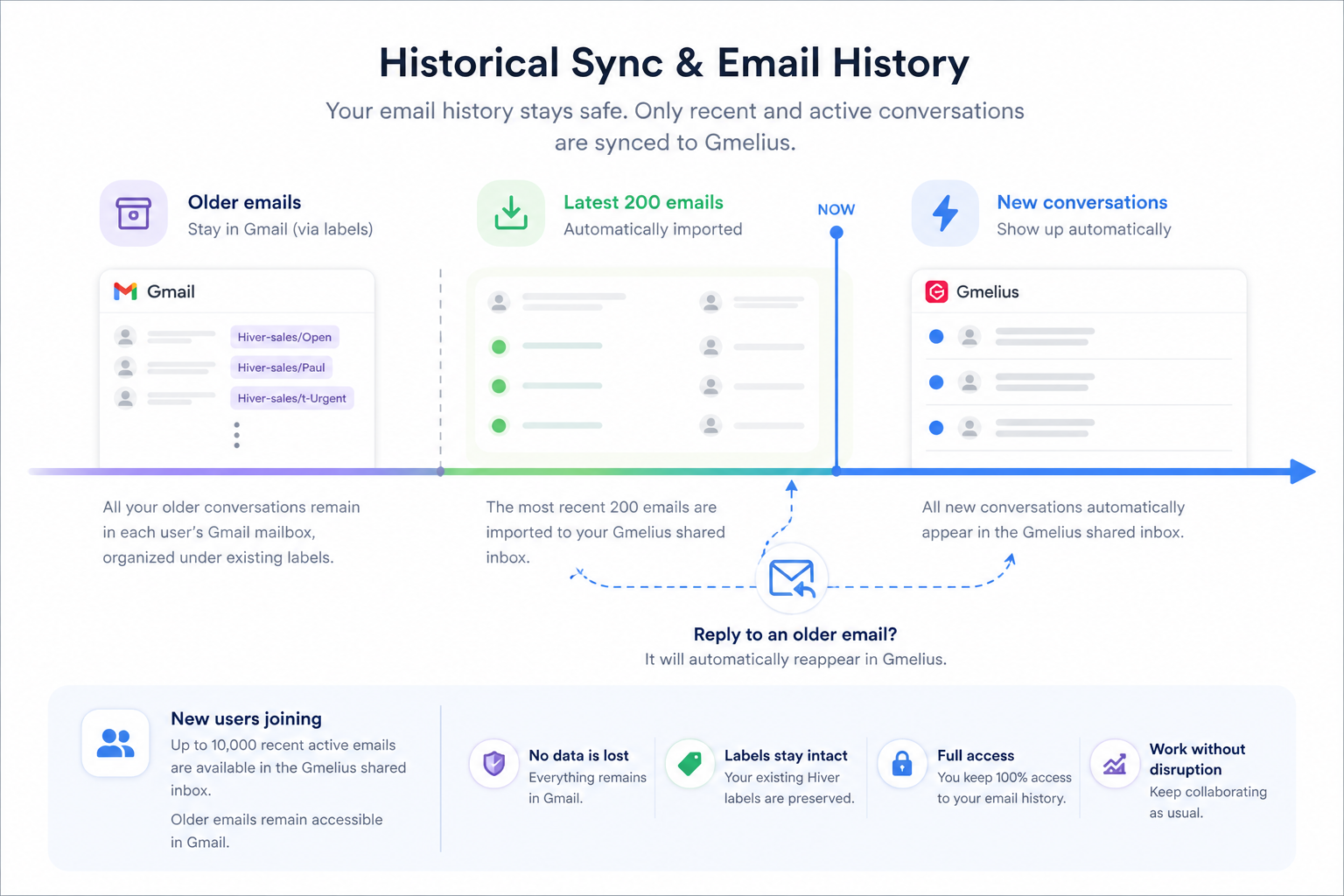
One of the most important points to understand is how historical emails are handled. All users already retain full access to historical emails previously managed in Hiver. These emails remain available directly in their personal Gmail mailboxes, organized under existing labels. There is no need to import or duplicate historical emails. The only change is where archived emails are displayed, not whether they are accessible.
How historical synchronization works
- The latest 200 emails can be automatically imported. These represent the most recent and active conversations
- New conversations automatically appear in the Gmelius shared inbox
- Older emails remain in each user’s mailbox, accessible via labels
- If someone replies to an older thread, it will automatically reappear in the Gmelius shared inbox
New users
For users joining the system during or after the migration:
- Up to 10,000 active recent emails are available in the Gmelius shared inbox
- Older emails beyond this limit remain accessible in Gmail
4. Searching Hiver Emails After Migration
Since Hiver uses a label-based structure for:
- assignment
- status
- tags
You can continue using Gmail search logic to retrieve historical or structured conversations.
Search format
Use the following query:
Hiver-<workspace>/<status|assignee|t-tags>
Variables explained:
<workspace>→ the name of your shared inbox<status>→ email status (e.g., Open, Closed)<assignee>→ the user assigned to the conversation<t-tags>→ specific tag name (replace with the actual tag)
Example query
If you want to find:
- emails from the Hiver sales shared inbox
- assigned to Paul
- that are Open
- tagged as Urgent
You can use:
Hiver-sales/Paul Hiver-sales/Open Hiver-sales/t-Urgent
Bonus tip: organizing results
Once you’ve found the right emails, you can:
- Select them in Gmail
- Move them into a dedicated Gmail folder
This creates a permanent view without needing search queries again.
Onboarding session
In order to understand your needs and previous configuration with Hiver, please fill out the short form below and get directly in touch with a Gmelius Product Coach who will help you set Gmelius up and smoothen your migration journey. It's free.
How did we do?
How to migrate from Google Groups to Gmelius
How to migrate from Front to Gmelius
